
Does Waste Volume Affect Warehouse Throughput?
Table of Contents
- Does Waste Volume Affect Warehouse Throughput? The Short Answer
- Warehouse Throughput Metrics: How to Measure Flow Over Time
- Where Waste Volume Actually Slows Throughput
- Quantifying Waste: A Practical Method for Your Warehouse
- Warehouse Waste Reduction: Separating Waste From Demand and Capacity
- Warehouse Waste Management and Layout: Designing Flow That Holds Up
- Warehouse Waste Compaction: A Trade-Off Worth Understanding
- Conclusion
- Frequently Asked Questions
Last Updated: October 17, 2026
Does Waste Volume Affect Warehouse Throughput? The Short Answer
Yes, waste volume affects warehouse throughput, but not in the simple way most operations teams assume. At Junk Crusher, we work with distribution centers and manufacturing plants across Western Pennsylvania, and the pattern repeats: waste builds up, handling slows down, and throughput quietly drops before anyone connects the two.
Warehouse throughput is the rate at which a facility moves goods through receiving, storage, picking, packing, and shipping within a set time window.
Here is the part most guides get wrong. Waste does not usually steal throughput by taking up floor space.
Below, we'll show you exactly how to measure that effect, separate it from demand and capacity problems, and decide whether compaction earns a place in your operation.
Warehouse Throughput Metrics: How to Measure Flow Over Time
Warehouse throughput metrics are the numbers that show how fast goods actually move through your facility. Without them, waste problems stay invisible until they show up as missed ship dates.
Units Per Hour, Cycle Time, and Velocity
Three metrics carry most of the weight:
- Units per hour: total units shipped divided by labor hours worked
- Cycle time: the elapsed time from order release to shipment
- Velocity: how quickly inventory moves from receiving to outbound
Track all three across the same time window. A single metric can mislead you.
If units per hour holds steady but cycle time climbs, you likely have a bottleneck, not a demand problem.
Measure at the process level too, not just facility-wide. Receiving, picking, packing, and shipping each deserve their own throughput rate.
For a standard reference on process measurement, the American Society for Quality's process improvement resources cover cycle time and process capability in useful detail.
Where Waste Volume Actually Slows Throughput
Waste slows throughput through three channels: waiting, motion, and transport. Each one adds time to a process without adding a single shipped unit.
Waiting, Motion, and Transport Waste
Waiting waste happens when workers stop productive work to deal with debris.
Motion waste is the extra walking and reaching caused by clutter. When waste containers sit in travel paths, pickers take longer routes.
Transport waste covers moving waste further than needed.
A common mistake is treating these as housekeeping issues. They are throughput issues wearing a janitorial costume.
Quantifying Waste: A Practical Method for Your Warehouse
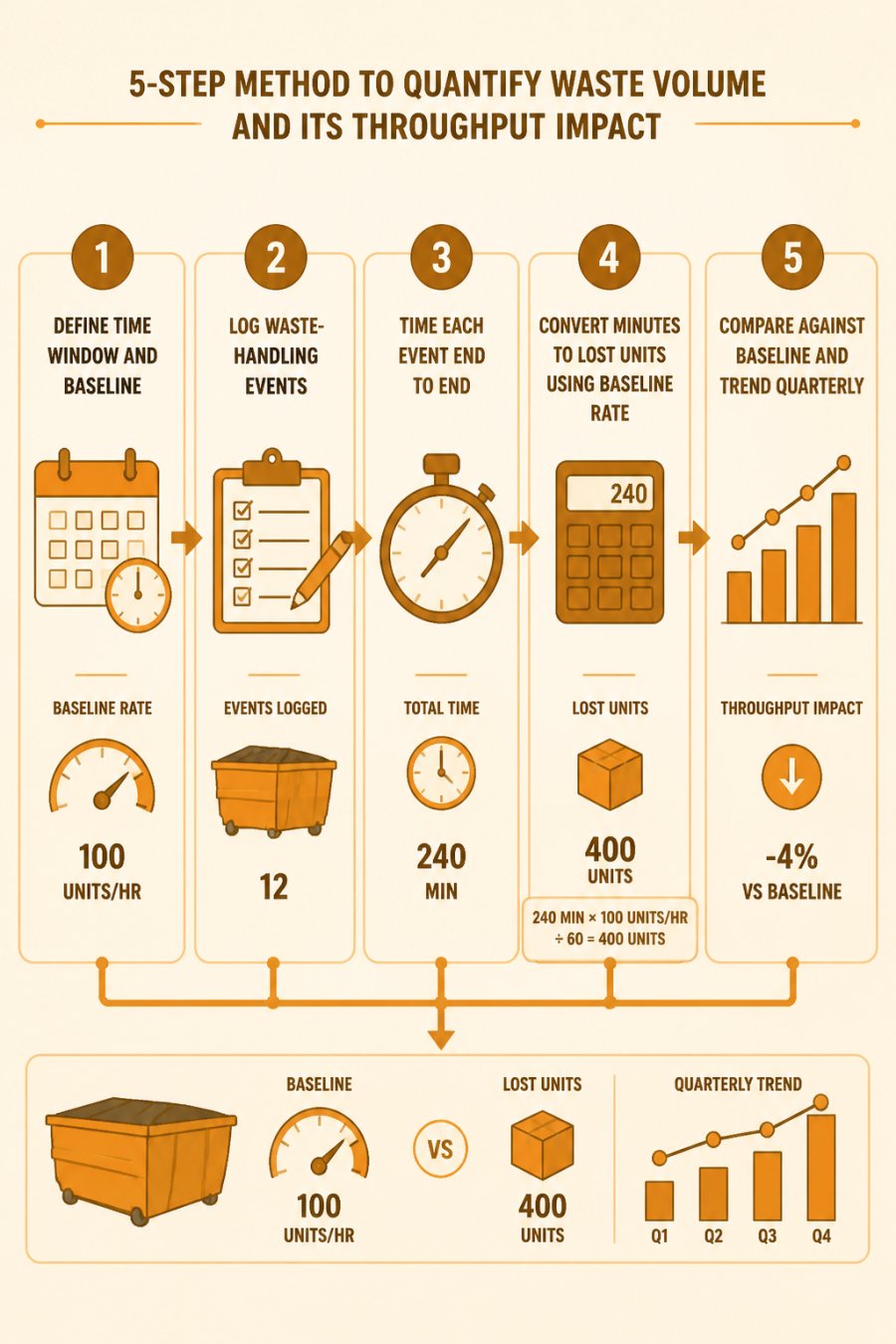
Most guides tell you to "reduce waste" and stop there. The gap none of them close is the arithmetic: how do you convert a pile of cardboard and a blocked aisle into a defensible units-per-hour loss? The method below does exactly that, using a clipboard, a stopwatch, and your existing throughput baseline. No new software required.
Step 1: Lock the time window and the baseline
Pick one full shift or one full week, consistency matters more than length. Record your baseline throughput for that same window: total units shipped divided by total labor hours worked. If you ship 4,800 units across 240 labor hours, your baseline is 20 units per hour. Write that number down; every later calculation hangs off it.
Step 2: Log every waste-handling event
Walk the floor for the full window and log each event where a worker stops productive work to deal with waste. Capture four fields: time of day, location (receiving, pick aisle, pack station, shipping dock), who handled it, and what triggered it (overflow, blocked path, spill, swap). A common pattern is 15 to 40 events per shift in a mid-size facility, enough that memory alone will undercount them badly.
Step 3: Time each event end to end
Time the whole trip, not just the lift. Include the walk to the container, the load, the return, and any waiting for a swap or a cleared aisle. A single unplanned trash run from a pack station often runs 4 to 9 minutes once travel and waiting are included. Multiply by event count to get total waste-handling minutes for the window.
Step 4: Convert minutes to lost units
This is the step competitors skip. Use your baseline rate as the conversion factor:
Lost units = waste-handling minutes ÷ 60 × baseline units per hour
Worked example: 30 events × 6 minutes average = 180 minutes = 3 labor hours. At a 20 units-per-hour baseline, that is 60 units of throughput capacity consumed by waste handling in a single shift, roughly 1.25% of a 4,800-unit day, and far more if the events cluster in picking or packing where the constraint sits.
Step 5: Compare against baseline and trend it
The gap between measured throughput and baseline throughput, adjusted for demand and staffing changes, is your waste-driven loss. Run the audit once per quarter. A single reading is noise; a rising trend across two or three quarters is a signal worth acting on.
What to measure beyond time
Time is the easiest metric, but three others sharpen the picture:
- Travel distance: step-count or pedometer data on pickers before and after a layout change shows motion waste directly.
- Rework rate: units pulled back for repacking because debris contaminated a tote or damaged a label.
- Swap downtime: minutes a dock sits idle waiting for a container exchange, which is pure waiting waste at the constraint.
Each of these maps back to the same units-per-hour conversion, so you can rank waste types by throughput impact rather than by how visible they are.
Warehouse Waste Reduction: Separating Waste From Demand and Capacity
Warehouse waste reduction only works if you first rule out demand and capacity as the cause of a throughput drop. This is where most improvement projects go sideways, a team blames clutter, buys a compactor, and the real constraint was a packing station running at capacity the whole time. The discipline below separates the causes before you spend a dollar.
The four suspects, ranked by likelihood
When throughput falls, four things can be responsible. Check them in this order, because the first three are more common than waste:
- Demand mix shift. Total order volume can hold steady while the mix changes, more small multi-line orders, fewer pallet picks. Throughput rate falls even with zero waste because each order now costs more touches.
- Staffing and schedule. Fewer pickers, more new hires, or a shift change that leaves the constraint understaffed all lower units per hour with no change on the floor.
- Equipment availability. A down conveyor, a forklift in the shop, or a pack station running at its cycle-time ceiling caps throughput regardless of floor conditions.
- Waste volume. Only after the first three are ruled out does waste become the leading suspect.
The control-chart test
Plot units per hour by shift for eight to twelve weeks. If the drop appears as a step change on the same date as a staffing or equipment event, the cause is almost certainly that event, not waste. If the drop is gradual and tracks with a rising waste-handling trend from your quarterly audit, waste is the better explanation.
The trade-off competitors miss
Reducing one waste type can create a bottleneck elsewhere. Moving waste containers out of pick aisles eliminates motion waste but lengthens the walk to the container, which adds transport waste. Adding a compactor at the pack station cuts haul frequency but inserts a processing step that becomes waiting waste if it is not scheduled into the workflow.
A repeatable diagnostic workflow
Run this sequence whenever throughput slips:
- Map the process from receiving to shipping and mark where waste accumulates.
- Identify the constraint, the single step with the lowest units per hour.
- Prioritize waste by its measured impact at that constraint, not by visibility.
- Test one change at a time and measure units per hour before and after.
- Monitor for two to four weeks before declaring success, and watch for the trade-off shifting the bottleneck.
This workflow keeps waste reduction tied to throughput rather than to appearance, which is the difference between a program that pays back and one that just looks tidier.
Warehouse Waste Management and Layout: Designing Flow That Holds Up
Warehouse waste management works best when it is designed into the layout, not bolted on afterward.
Design principles that hold up:
- Put waste points where waste is generated. Packing stations produce cardboard; receiving produces wrap and pallets.
- Keep travel paths clear. No container should sit in a main aisle.
- Limit handling steps. Every extra touch is lost time.
For broader guidance on facility flow, the U.S. Environmental Protection Agency's waste reduction resources cover source reduction and materials management in practical terms.
Here at Junk Crusher, we see the payoff firsthand. For facilities already renting roll-offs, our dumpster rental options pair naturally with compaction.
Warehouse Waste Compaction: A Trade-Off Worth Understanding
Warehouse waste compaction is not free throughput.
The math usually favors compaction when three conditions hold:
- Waste volume is high and steady
- Hauls are frequent enough that swap downtime hurts
- Floor space for multiple containers is tight
It favors traditional hauling when waste volume is low or highly variable. In those cases, the equipment and coordination overhead may not pay back.
The honest limitation: compaction adds a processing step.
When it fits, the results compound. Fewer hauls mean fewer truck trips, less downtime, and a smaller carbon footprint from transport.
| Situation | Better Fit | Why |
|---|---|---|
| High, steady waste volume | On-site compaction | Cuts haul frequency and swap downtime |
| Low or erratic volume | Standard hauling | Overhead outweighs savings |
| Tight yard space | Compaction | Fewer containers needed |
| Multiple sites | Scheduled compaction service | Consistent process across locations |
Conclusion
The real challenge is not proving that waste affects throughput. It is measuring the effect honestly, then acting on what the numbers show.
That is where we come in. Junk Crusher's mobile on-site compaction reduces roll-off volume by up to 70%, cuts required hauls, and shrinks the truck trips behind your carbon footprint.
Book a Crush with Junk Crusher and turn wasted handling hours back into throughput.
Frequently Asked Questions
Does waste volume affect warehouse throughput?
Yes, but usually indirectly. Waste volume itself does not move product, so it competes for the same labor, space, and equipment that warehouse throughput depends on. When waste piles up, associates spend more time handling, moving, and staging it, and that time comes out of picking, packing, and shipping. The effect is largest when waste handling creates a process bottleneck or forces extra travel. If your warehouse has spare capacity and stable staffing, the impact can be small. Measure it before assuming it is the main constraint.
How do warehouse throughput metrics show the impact of waste?
Track units per hour, orders per hour, cycle time, and processing time alongside waste handling hours. If throughput dips while waste handling hours rise and demand is flat, waste is a likely contributor. Compare a baseline week to a week with a waste backlog, and look at waiting time and travel distance per order. These warehouse throughput metrics turn a vague complaint into a number you can act on, and they help separate waste from staffing or demand changes.
What is the fastest way to reduce waste handling time?
Start with the waste that moves most often. Consolidate collection points, schedule removal around picking waves instead of during them, and keep waste containers close to where waste is generated. Reducing handling steps and travel distance usually delivers the quickest gain in warehouse waste reduction. For bulky, low-density waste, compaction can cut the number of container swaps and hauls, which frees labor and yard space. Measure handling time before and after so you can prove the change worked.
How does warehouse waste compaction fit into throughput improvement?
Compaction reduces the volume of waste in a container, so containers fill more slowly and need fewer swaps and hauls. That cuts transport waste and the labor spent managing full containers, which supports warehouse throughput when waste handling is a constraint. It is not a fix for picking or receiving bottlenecks. Pair compaction with layout and scheduling changes, and confirm the savings in handling hours and container swaps before scaling it across sites.


