
How to Reduce Order Picking Travel Time in Your Warehouse
Quick Summary
To reduce order picking travel time, measure a repeatable baseline first, then improve slotting so fast-moving items sit near the pick face and packing station. Next, plan routes that remove backtracking, and test batch or zone picking in one area before rolling it out. Re-measure after each change.
- Pickers can spend more than half their shift walking rather than picking.
- Track travel distance per order line and lines picked per labor hour.
- Use ABC slotting to place fast movers near the pick face and packing station.
- Plan S-shape routes that walk each aisle once to eliminate backtracking.
- Batch picking cuts travel but adds sorting work and possible sorting errors.
Table of Contents
- Why Order Picking Travel Time Matters for Warehouse Labor Costs
- Measure Your Baseline Before Changing Anything
- Warehouse Slotting Strategies That Shorten Pick Walks
- Order Picking Methods and When Each One Fits
- Warehouse Picking Route Optimization and Backtracking Reduction
- Batch Picking in a Warehouse: Trade-Offs and Setup
- Implementing Changes in a Sequence and Keeping Gains
- Frequently Asked Questions
Why Order Picking Travel Time Matters for Warehouse Labor Costs
Order picking is often the most expensive part of running a warehouse. Pickers can spend more than half their shift walking, not picking. Every extra step adds labor cost, slows shipments and wears on your staff. Reducing how far pickers travel is one of the fastest ways to cut costs without buying new equipment.
Here is the core idea: a picker who walks less picks more lines per hour. Many warehouse teams find that travel is the biggest single drain on picking productivity. Even small cuts in walking distance add up across thousands of orders each week.
Where the time goes:
- Walking to the pick location
- Backtracking through the same aisle
- Waiting in congested aisles
- Trips to drop off totes at the packing station
Operations managers often find that their pick routes grew over time as SKUs were added. The layout that worked for 500 items may not work for 5,000.
Measure Your Baseline Before Changing Anything
Most guides jump straight to tactics. The step they skip is the one that tells you whether any tactic worked: a repeatable baseline. Without it, you cannot separate a real improvement from a busy week or a seasonal shift.
A practical baseline has three parts: a defined travel metric, a time-study method, and a fixed comparison window.
1. Define your travel KPIs. Pick two or three metrics and keep their definitions identical every time you measure:
- Travel distance per order line: Total feet walked divided by lines picked. This normalizes for order size.
- Travel time as a share of pick time: Walk time divided by total pick time. A common pattern is that walking dominates, so this ratio shows how much room you have.
- Lines picked per labor hour: The output side of the equation. If travel falls but lines per hour does not rise, the change did not pay off.
- Stops per order: How many distinct locations a picker visits. Fewer stops usually means less walking.
2. Run a time study, not a guess. For one to two weeks, sample a handful of pickers across shifts. Use a stopwatch or a pick-path report from your warehouse management system to record distance and time for a set of orders. If you have no system report, a clipboard and a tape measure on a sample of aisles will do. The goal is a consistent sample, not a perfect one.
3. Fix the comparison window. Measure across normal volume, not a holiday peak or a slow week. Record the date range, the order count, and the SKU count so a later measurement uses the same conditions.
4. Set one target and one review date. A single clear target, such as cutting travel distance per line by 15 percent in one zone, keeps the project focused. Put a review date on the calendar before you change anything.
Watch out: comparing a slow week to a busy week will make almost any change look successful. Lock the measurement window before you start.
A baseline-and-measurement framework lets you defend a slotting or equipment investment later, because you can show the before-and-after numbers rather than a hunch.
Warehouse Slotting Strategies That Shorten Pick Walks
Slotting means deciding where each product lives in the warehouse. Good slotting puts fast-moving items close to the picking and packing areas. Slow movers go farther away.
A common method is ABC slotting. You rank SKUs by how often they are picked:
| Class | Share of Picks | Where to Store |
|---|---|---|
| A (fast movers) | Top 20% of SKUs | Near the pick face and packing station |
| B (medium) | Next 30% of SKUs | Middle aisles |
| C (slow movers) | Bottom 50% of SKUs | Back aisles or upper racks |
Also keep items that are often ordered together near each other. If customers frequently buy a bottle and its matching cap, store them in the same area. This cuts the number of stops per order.
Many small warehouses can do this with a spreadsheet and a few hours of work. You do not need expensive software to start.
Order Picking Methods and When Each One Fits
The picking method you use changes how far people walk, but no single method fits every operation. The useful question is not which method is best; it is which method fits your order profile, SKU count, labor, and congestion risk. Here is how the common methods compare on those dimensions.
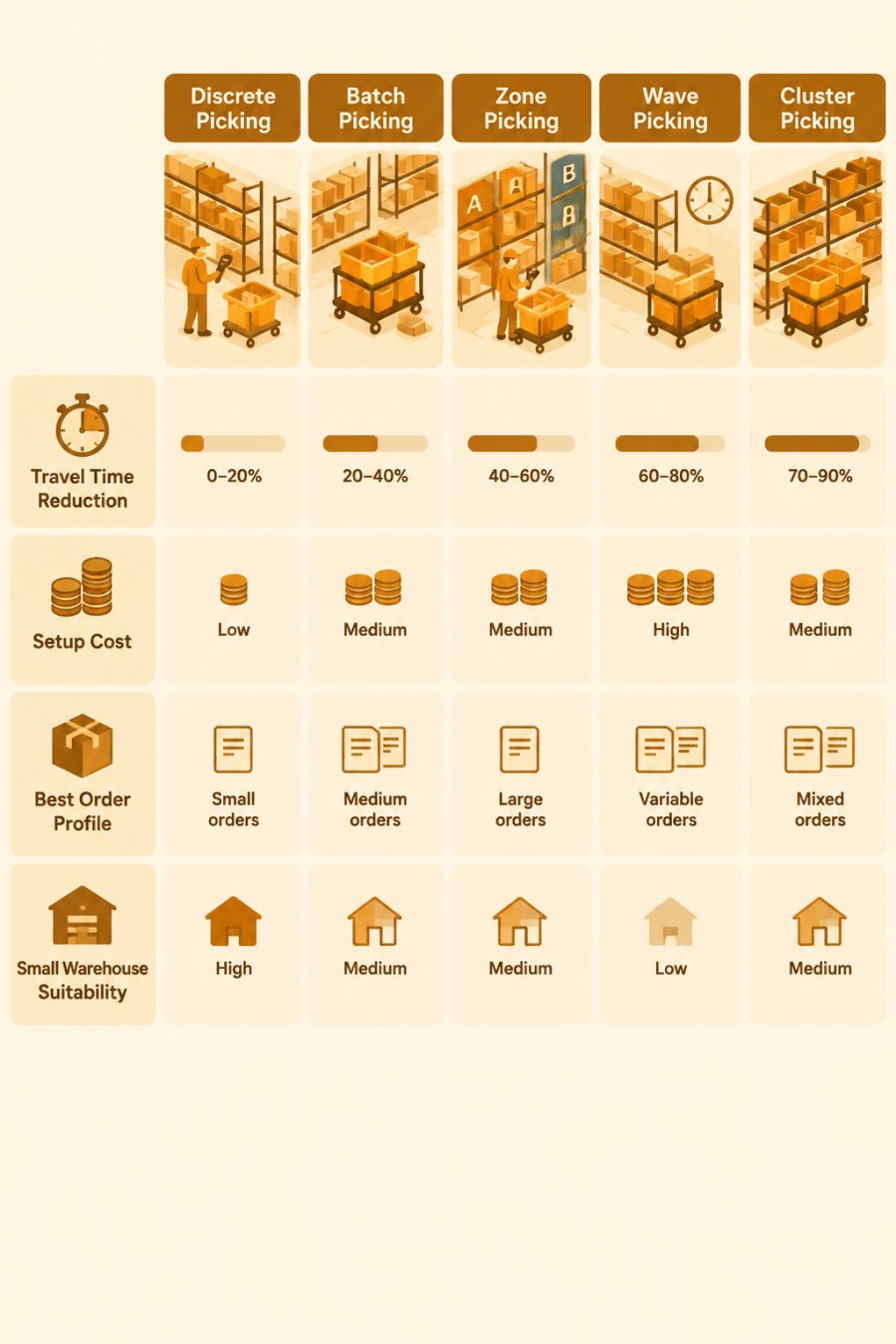
| Method | How it works | Travel impact | Setup cost | Best order profile | Congestion risk | Small-warehouse fit |
|---|---|---|---|---|---|---|
| Discrete | One picker, one order at a time | High; repeat trips to the same aisles | Low | Low volume, large orders | Low | Good starting point |
| Batch | One picker collects for several orders | Lower; shared trips | Low to medium; needs sorting space | Many small orders with overlapping SKUs | Medium at the sort station | Workable with a cart and totes |
| Zone | Each picker stays in one area | Low within zone; orders must be combined | Medium; needs a consolidation step | High SKU count, large facility | Low in aisles, higher at consolidation | Poor fit if zones are tiny |
| Wave | Orders released in timed groups | Moderate; depends on wave size | Medium; needs scheduling discipline | Shipments on set schedules | High at wave release | Possible with manual waves |
| Cluster | One picker fills several orders on a multi-tote cart | Low; many lines per walk | Medium; needs carts and sort area | High volume, many small orders | Medium at sorting | Good fit with a modest cart fleet |
How to choose. Start with your order profile. If most orders are large and few, discrete picking with good slotting may be enough. If you have many small orders that share SKUs, batch or cluster picking usually saves the most travel. If your facility is large with a wide SKU range, zone picking keeps pickers from crossing the building. Wave picking fits when outbound trucks leave on fixed schedules and you need orders ready in groups.
The trade-offs to weigh. Batch and cluster picking cut travel but add a sorting step, and sorting errors can rise if totes get mixed up. Zone picking cuts aisle travel but adds a consolidation step that can become its own bottleneck. Wave picking can create a burst of congestion when a wave releases. Weigh the travel savings against the added handling before you commit.
A low-tech starting point. Small warehouses without a warehouse management system can still test a method change. Group orders by shared SKUs on a spreadsheet, cap each batch at five to ten orders, and use a cart with labeled totes. Measure sorting errors alongside travel time so you can see whether the batch size is working.
!Comparison matrix of discrete, batch, zone, wave, and cluster picking across travel time reduction, setup cost, best order profile, and small-warehouse suitability
Warehouse Picking Route Optimization and Backtracking Reduction
Backtracking happens when a picker walks down an aisle, picks one item, and walks back the same way. Route planning removes this waste.
Here is a practical approach:
- Map your aisles and mark where each high-volume SKU sits.
- Sort each pick list into the order the picker reaches each location.
- Use an S-shape or return route that walks each aisle only once.
- Check peak aisles for congestion and split heavy traffic across zones.
Many Warehouse Management System guides explain how route algorithms sequence picks automatically. Your warehouse management system may already offer this feature, so check before buying new software.
Pickers often resist new routes at first. Explain the reason, and show them the baseline numbers from your measurements.
Batch Picking in a Warehouse: Trade-Offs and Setup
Batch picking can cut travel sharply, but it adds sorting work at the end. You must weigh the savings against the extra step.
Benefits:
- Fewer trips to the same aisles
- More lines picked per walk
- Good fit for many small orders with overlapping items
Trade-offs:
- Sorting totes into individual orders takes time
- Errors can rise if totes get mixed up
- Batches must be sized carefully, since very large batches slow down sorting
To set it up, group orders that share SKUs and cap each batch at a size your sorters can handle. Start with small batches of five to ten orders, then adjust based on your measurements. Tracking sorting errors alongside travel time shows whether the batch size is working.
Implementing Changes in a Sequence and Keeping Gains
Make one change at a time so you can see what works. A practical order is:
- Fix slotting for the top fast-moving SKUs.
- Update pick routes to remove backtracking.
- Test a picking method change in one zone.
- Roll out successful changes across the warehouse.
Re-measure your baseline metrics after each step. Plan a check every month, because new products and seasonal orders shift pick patterns. Slotting that worked last quarter may need adjusting this quarter.
Reducing order picking travel time is ongoing work, not a one-time project. Warehouses that keep measuring and adjusting see gains that last. Junk Crusher can also help your operation stay efficient on the waste side with our mobile dumpster compaction service, which includes 20 and 25 yard dumpsters. Learn more on our dumpster compaction page.
Frequently Asked Questions
How does slotting reduce order picking travel time?
Slotting assigns SKUs to storage locations based on how often they are picked and how often they are ordered together. Placing high-velocity SKUs near the pick face or packing station shortens the average walk per order line. Pairing items that frequently appear on the same order also reduces the number of aisles a picker must visit. Re-slotting works best after a baseline measurement shows which aisles absorb the most travel, so the changes target the actual sources of walking rather than assumptions about the layout.
How should a warehouse measure picker travel time?
Start by recording the travel distance and elapsed time for a representative sample of picks over one to two weeks, using handheld scanner timestamps, pedometers, or warehouse management system logs where available. Calculate travel time as a share of total pick time, and break results down by zone, shift, and order profile. Track backtracking separately, since returning to an already visited aisle adds distance without adding picks. Keep the same measurement method after changes so the before and after numbers are comparable.
Can batch picking reduce travel time?
Batch picking can reduce travel time when many orders share the same SKUs or locations, because one walk through an aisle fills several orders at once. The gains fall off when orders are small, scattered, or highly varied, and sorting time at the end of the batch adds labor. Test batch sizes on a limited set of order types before rolling the method out across the whole operation, and compare total labor per order, not just walking distance.
How can warehouse software optimize picking routes?
A warehouse management system or dedicated optimization tool can sequence pick locations to minimize total walking distance, often using a travel-distance algorithm applied to each pick list. Some systems also release picks in waves or assign orders to zones dynamically. Software improves routing only when storage locations are accurate and kept up to date, so slotting data quality should be verified first. Pricing and licensing vary by vendor and deployment, so request a quote from the specific provider for current costs.


